A tester has checked the module versions in UAT. The security fix is present, the checks pass, and the release is approved for production.
Those are useful facts. But they do not, on their own, answer the question a site owner needs answered: what is running on production now?
Across multiple Drupal websites, that question becomes harder. Sites have different release schedules, hosting arrangements and people responsible for them. A change can be ready for one environment and still waiting to reach another. A spreadsheet can describe last month’s estate perfectly while saying very little about today’s.
The problem is a gap in evidence. Before deciding which sites need attention, a team needs a dependable view of what each production site reports, how recent that information is and what has actually been assessed.
Start with the live environment
Repository checks tell us important things about the code and dependencies being checked. Deployment records tell us what a release process attempted and completed. A fresh observation from the intended production environment adds another piece: the versions that environment reports after the change.
These records should support each other. If they disagree, the discrepancy needs an explanation.
Consider a hypothetical release. A tester confirms that UAT contains the fixed module version. The team approves it and deploys to production. Later, a rollback restores an older release, or another deployment reintroduces the earlier dependency version.
The original QA result remains accurate for the environment and release that were tested. It does not describe production after that subsequent change. Checking the version once in UAT cannot establish that it remains the same on the live site.
Without recurring production reporting, someone has to repeat the version check, reconcile it with the release records and pass the result between the tester, developer and release owner. Across many sites, those repeated checks and handovers add work while the production picture can still become outdated.
A dashboard should show what it does not know
A list of component versions is a starting point. To make it useful, teams need to ask:
- Is this the intended production environment?
- When did it last report its inventory?
- When was that inventory assessed against available advisory information?
- Which components were assessed, and which could not be?
- What evidence supports the next maintenance action?
Inventory freshness and assessment freshness are different. A recent check of an old inventory does not establish that a new deployment has reached the site.
Missing information matters too. A site that has gone quiet should not look reassuring simply because no new finding arrived. An incomplete assessment needs to remain visibly incomplete.
How Sentinel Connector addresses the gap
This is the problem we are addressing with Sentinel Connector, our Drupal monitoring product.
Once the connector is configured on the intended production site and scheduled reporting is running, Sentinel automates recurring Drupal core and module inventory reporting and assessment against Drupal release and advisory information. Teams can review the results across connected sites without asking someone to open each administration screen and manually check the versions again.
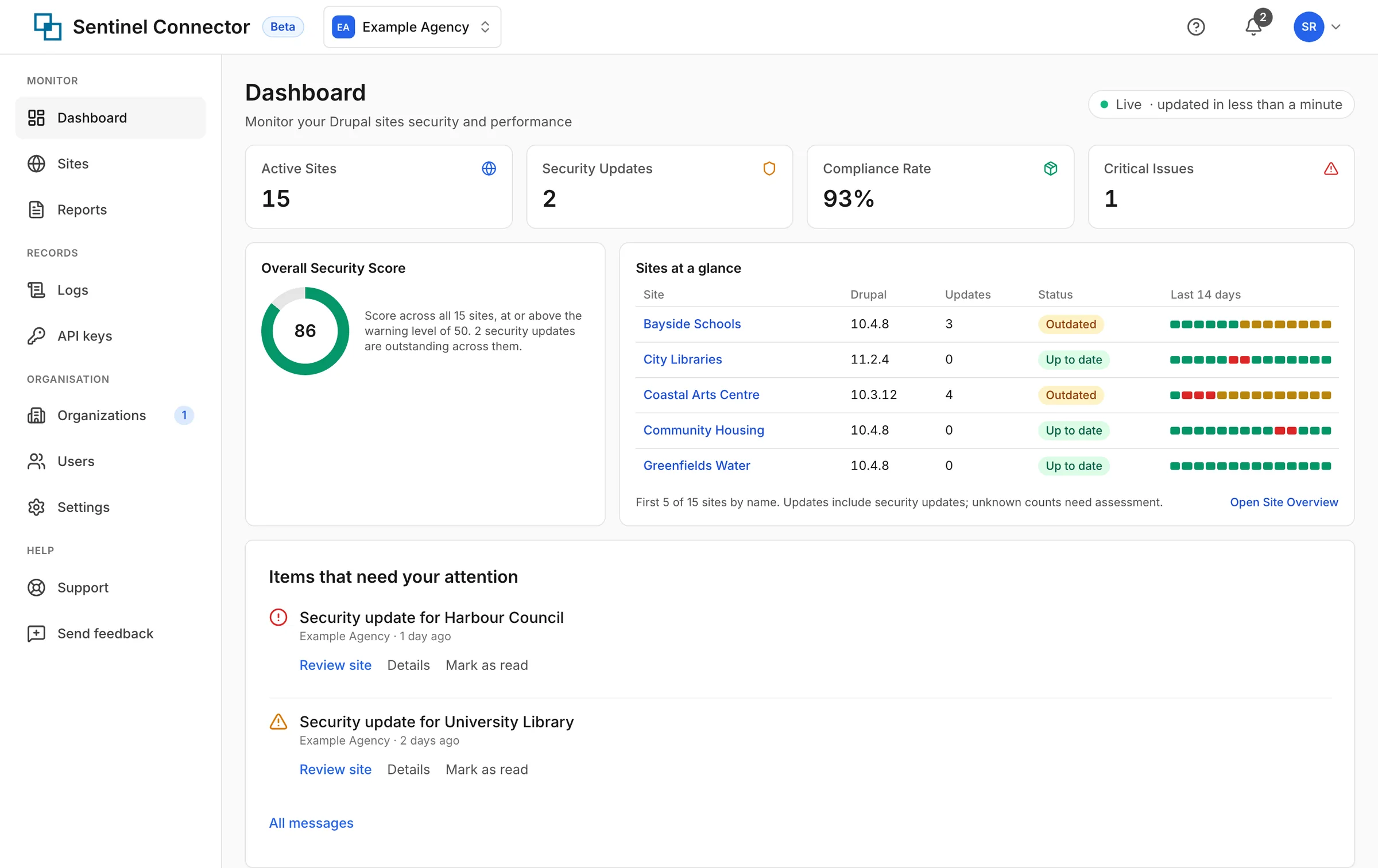
Sentinel Connector dashboard example, using fictional sample data. Figures illustrate the interface, not customer results. Source: Sentinel Connector.
After a rollback or subsequent deployment, a fresh inventory provides evidence of the versions production now reports. That reduces repetitive version checking and the handovers needed to assemble a fleet-wide picture. Reporting and assessment still need to complete successfully; it is not a continuous, real-time guarantee.
The important part is the context around each result. Sentinel shows coverage and freshness, keeps unassessed components visible, and distinguishes newly received inventory from a completed assessment. A reported version and its assessment can then become evidence for a specific maintenance decision, rather than another unexplained status badge.
Sentinel does not yet apply security updates or scan custom modules for vulnerabilities. These are upcoming features, not part of the beta capabilities described here. Teams still need their normal review, testing and deployment processes. Keep appropriate Composer dependency checks alongside production reporting, including for the wider PHP dependency set.
Its current capabilities also include patching-target tracking and monthly reporting. These help teams discuss recorded outcomes with customers or internal stakeholders. The time a fix is observed is not necessarily the time it was installed, so deployment records still matter.
Verification has boundaries
This automates a specific part of release assurance: collecting and assessing reported production versions. It does not replace functional QA, regression testing, user acceptance testing or the decision to approve a release.
Production reporting is evidence from a connected environment. It is not independent proof of every file on a server, a guarantee that a site is secure, or a substitute for confirming that the right environment is connected.
The aim is a clearer maintenance conversation: here is what the site reported, here is what we assessed, and here is what still needs attention.
Help shape the beta
Sentinel Connector is in beta. We want feedback on whether its evidence is clear enough to help teams make decisions across their Drupal websites, especially when information is incomplete or a release is still in progress.
If you manage a Drupal estate, explore Sentinel Connector or contact the team about your monitoring and reporting needs.
The question we want to make easier to answer is simple: can we show what production is reporting, rather than assume it matches the plan?